
You copied an API response, pasted it into your editor, and got a wall of text with no line breaks. Or you're staring at a package.json wondering why npm is throwing a parse error at line 47. Or a coworker sent you a "JSON file" that's actually a JavaScript object with single quotes and trailing commas.
JSON is the most common data format on the web, and most developers learn it by osmosis — picking up bits and pieces without ever sitting down to understand the full picture. This guide fills in the gaps.
JSON is Not JavaScript
JSON stands for JavaScript Object Notation, but that name is misleading. JSON is a language-independent data format that happens to borrow its syntax from JavaScript. Every major programming language — Python, Go, Rust, Java, C#, Ruby, PHP — can read and write JSON natively.
Douglas Crockford didn't invent the syntax. He identified a useful subset of JavaScript's object literal notation, gave it a name, wrote a specification, and published it at json.org in 2002. It took off because developers were tired of XML's verbosity, and JSON mapped directly to the data structures they were already using: objects (dictionaries/maps) and arrays (lists).
Here's the critical distinction that trips people up every day:
// This is a JavaScript object — valid JS, invalid JSON
{
  name: 'Ada Lovelace',
  born: 1815,
  languages: ['English', 'French'],
  // She was remarkable
}
// This is JSON — valid JSON, also valid JS
{
  "name": "Ada Lovelace",
  "born": 1815,
  "languages": ["English", "French"]
}
The differences: JSON requires double-quoted keys, double-quoted strings, no trailing commas, and no comments. If your JSON won't parse, one of those four rules is almost always the culprit. (More on debugging parse errors below.)
The Complete Type System
JSON has exactly six data types. That's it. No dates, no undefined, no functions, no special number types.
| Type | Example | Notes |
|---|---|---|
| String | "hello" | Must use double quotes. Supports Unicode escapes (\u00e9). |
| Number | 42, 3.14, -1, 2.5e10 | No hex, no octal, no NaN, no Infinity. |
| Boolean | true, false | Lowercase only. True and FALSE are invalid. |
| Null | null | Lowercase. Not None, not nil, not NULL. |
| Object | {"key": "value"} | Unordered key-value pairs. Keys must be strings. |
| Array | [1, 2, 3] | Ordered list. Elements can be any type, including mixed. |
Notice what's missing:
- No dates. Dates are stored as strings (usually ISO 8601:
"2025-02-06T12:00:00Z"). Every team has to decide on a date format and parse it manually. - No undefined. If a field doesn't exist, omit it from the object entirely.
- No comments. JSON is pure data, not a configuration language. (JSONC and JSON5 add comments, but they're not standard JSON.)
- No binary data. You can't embed raw bytes. Use Base64 encoding instead — the Base64 encoder handles this if you need to embed binary data in a JSON payload.
Real-World JSON Structures You'll Encounter
API Responses
The most common JSON you'll work with. Here's a realistic example from a paginated API:
{
  "data": [
    {
      "id": "usr_a1b2c3",
      "email": "ada@example.com",
      "name": "Ada Lovelace",
      "role": "admin",
      "created_at": "2025-01-15T09:30:00Z",
      "metadata": {
        "login_count": 147,
        "last_ip": "192.168.1.1"
      }
    },
    {
      "id": "usr_d4e5f6",
      "email": "grace@example.com",
      "name": "Grace Hopper",
      "role": "member",
      "created_at": "2025-01-20T14:15:00Z",
      "metadata": {
        "login_count": 23,
        "last_ip": "10.0.0.42"
      }
    }
  ],
  "pagination": {
    "page": 1,
    "per_page": 20,
    "total": 2,
    "total_pages": 1
  }
}
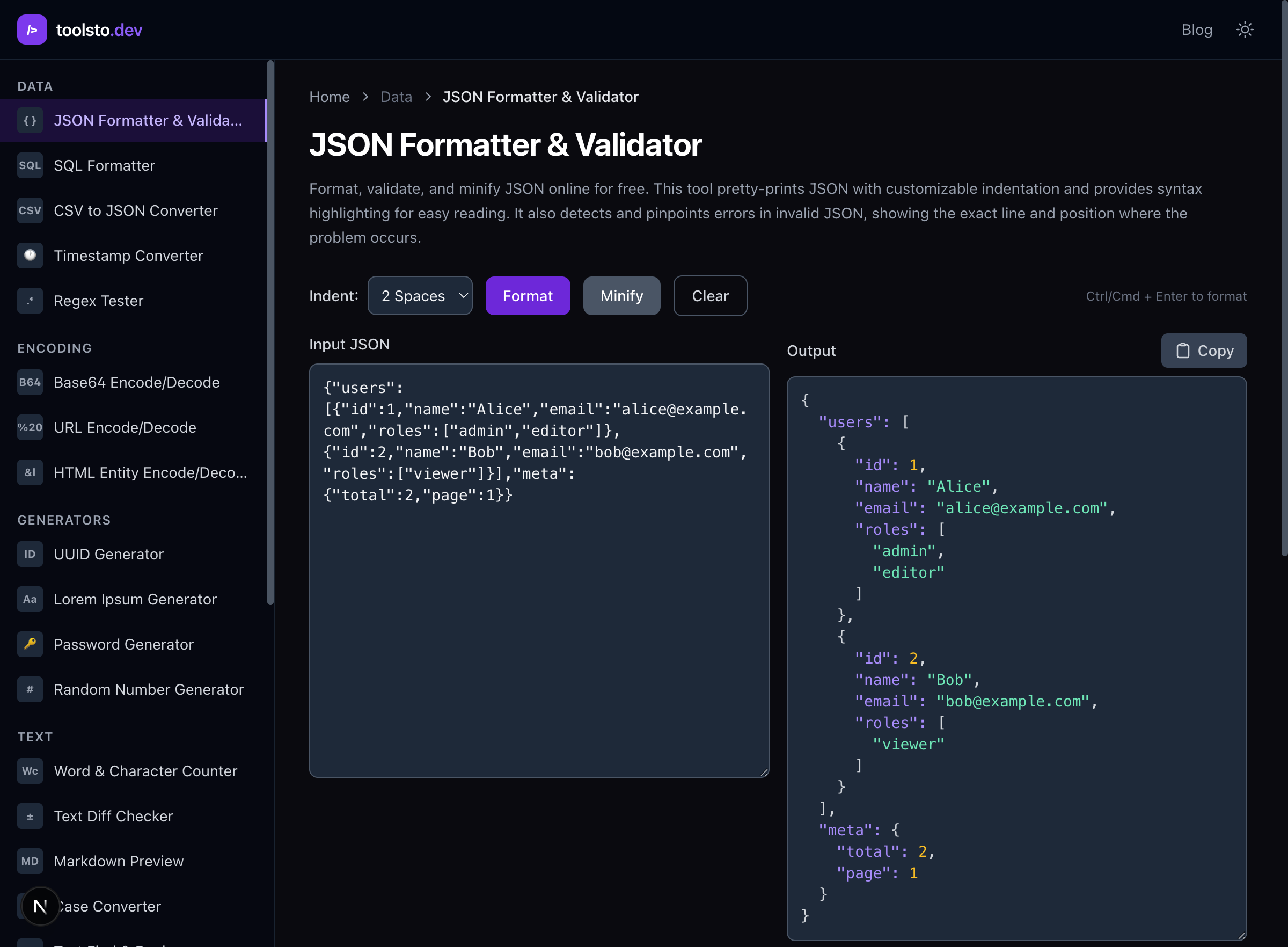
When you get a response like this from an API and need to make sense of it, paste it into a JSON formatter to pretty-print it with syntax highlighting. Minified API responses are unreadable without formatting.
Configuration Files
Your project already has several of these:
{
  "compilerOptions": {
    "target": "ES2022",
    "module": "ESNext",
    "strict": true,
    "esModuleInterop": true,
    "outDir": "./dist",
    "rootDir": "./src",
    "paths": {
      "@/*": ["./src/*"]
    }
  },
  "include": ["src/**/*"],
  "exclude": ["node_modules", "dist"]
}
The package.json, tsconfig.json, .eslintrc.json, vercel.json — these are all JSON. (Though some, like tsconfig.json, technically support comments via JSONC, which is TypeScript's extension.)
Database Documents
MongoDB stores BSON (Binary JSON), and PostgreSQL has native json and jsonb column types. In PostgreSQL, you can query directly into JSON fields:
SELECT data->>'email' AS email
FROM users
WHERE data->'metadata'->>'login_count' > '100';
Parsing and Serializing: The Stuff That Actually Matters
JavaScript/TypeScript
// Parse a JSON string into an object
const user = JSON.parse('{"name": "Ada", "role": "admin"}');

// Serialize an object into a JSON string
const json = JSON.stringify(user);
// '{"name":"Ada","role":"admin"}'

// Pretty-print with 2-space indentation
const pretty = JSON.stringify(user, null, 2);

// Use a replacer to filter or transform fields
const safe = JSON.stringify(user, (key, value) => {
  if (key === 'password') return undefined; // strip sensitive fields
  return value;
}, 2);

// Use a reviver to transform on parse (e.g., convert date strings)
const data = JSON.parse(jsonString, (key, value) => {
  if (key === 'created_at') return new Date(value);
  return value;
});
The replacer and reviver functions are underused. The replacer is great for stripping sensitive fields before logging. The reviver is great for converting date strings into Date objects during parsing.
Python
import json

# Parse
user = json.loads('{"name": "Ada", "role": "admin"}')

# Serialize with indentation
print(json.dumps(user, indent=2))

# Handle non-serializable types with a custom encoder
from datetime import datetime

class DateEncoder(json.JSONEncoder):
    def default(self, obj):
        if isinstance(obj, datetime):
            return obj.isoformat()
        return super().default(obj)

json.dumps({"now": datetime.now()}, cls=DateEncoder)
Go
Go's encoding/json package uses struct tags to control serialization:
type User struct {
    ID        string `json:"id"`
    Email     string `json:"email"`
    Name      string `json:"name"`
    Role      string `json:"role"`
    CreatedAt string `json:"created_at"`
    Password  string `json:"-"` // never serialize this field
}

// Unmarshal into a struct
var user User
json.Unmarshal(data, &user)

// Marshal with indentation
output, _ := json.MarshalIndent(user, "", "  ")
The json:"-" tag is one of Go's best features for JSON handling — it ensures a field is never accidentally serialized.
Debugging JSON Parse Errors
You'll hit SyntaxError: Unexpected token or json.decoder.JSONDecodeError more often than you'd like. Here's a systematic approach:
1. Trailing Commas
The most common mistake. Valid in JavaScript, invalid in JSON.
{
  "name": "Ada",
  "role": "admin",   ← this comma kills it
}
2. Single Quotes
{'name': 'Ada'} ← invalid. JSON requires double quotes.
3. Unquoted Keys
{name: "Ada"} ← invalid. Keys must be double-quoted strings.
4. Comments
{
  "name": "Ada",  // this breaks parsing
  "role": "admin" /* so does this */
}
5. Special Number Values
{
  "value": NaN,       ← invalid
  "other": Infinity,  ← invalid
  "hex": 0xFF         ← invalid
}
6. Truncated Responses
If your JSON parse error points to the very end of the string, you probably received an incomplete response. Check for network timeouts or response size limits.
The Fix
Paste your broken JSON into a JSON formatter and validator. It'll pinpoint the exact line and character where parsing fails, which is faster than staring at a wall of text trying to spot a missing comma.
JSON Performance Considerations
Large Payloads
JSON.parse() is fast — V8 can parse JSON faster than it can parse equivalent JavaScript object literals. But for very large payloads (megabytes), consider:
- Streaming parsers like
json-streamorclarinetthat process JSON incrementally without loading the entire string into memory - Pagination on API responses to keep individual payloads small
- Field selection (like GraphQL or sparse fieldsets) to only request the data you need
Serialization Costs
JSON.stringify() is often the hidden bottleneck in Node.js APIs. If you're serializing the same data structure frequently:
fast-json-stringifygenerates optimized serializers from a schema (up to 2-5x faster)- Avoid serializing massive objects in hot paths — compute the response shape once and cache it
Alternatives to JSON
JSON isn't always the best choice:
| Format | When to Use |
|---|---|
| Protocol Buffers | High-throughput service-to-service communication. Binary, schema-required, much smaller than JSON. |
| MessagePack | Drop-in binary replacement for JSON. Same data model, smaller payloads, faster parsing. |
| YAML | Human-authored configuration files where comments matter (e.g., Docker Compose, Kubernetes manifests). |
| TOML | Simple config files. Less ambiguous than YAML, more readable than JSON. |
| CSV | Tabular data where you don't need nesting. |
For APIs that serve web browsers, JSON remains the standard. The alternatives are mainly useful for internal service communication or specific use cases.
Generating Types from JSON
If you're working in TypeScript, you shouldn't be manually writing interfaces for API responses. Paste a sample response into a JSON to TypeScript converter and get type definitions automatically:
// Generated from the API response above
interface ApiResponse {
  data: User[];
  pagination: Pagination;
}

interface User {
  id: string;
  email: string;
  name: string;
  role: string;
  created_at: string;
  metadata: Metadata;
}

interface Metadata {
  login_count: number;
  last_ip: string;
}

interface Pagination {
  page: number;
  per_page: number;
  total: number;
  total_pages: number;
}
This saves time and catches mismatches between your code and the actual API shape. For production systems, you'll want to pair this with runtime validation using Zod, Valibot, or ArkType to catch API contract changes that TypeScript can't see at compile time.
JSON Schema: Validation Beyond Types
For production APIs, you need to validate incoming JSON. JSON Schema lets you define not just types, but constraints:
{
  "$schema": "https://json-schema.org/draft/2020-12/schema",
  "type": "object",
  "properties": {
    "email": {
      "type": "string",
      "format": "email"
    },
    "age": {
      "type": "integer",
      "minimum": 0,
      "maximum": 150
    },
    "role": {
      "type": "string",
      "enum": ["admin", "member", "viewer"]
    }
  },
  "required": ["email", "role"],
  "additionalProperties": false
}
In practice, most TypeScript teams use Zod instead:
import { z } from 'zod';

const UserSchema = z.object({
  email: z.string().email(),
  age: z.number().int().min(0).max(150).optional(),
  role: z.enum(['admin', 'member', 'viewer']),
});

// Throws if invalid, with detailed error messages
const user = UserSchema.parse(requestBody);
Key Takeaways
JSON has six types, two structures, and five common mistakes that cause parse errors. It's not JavaScript — it's stricter. Here's what matters:
- Always double-quote keys and strings. No exceptions.
- No trailing commas, no comments. Use a linter if your editor doesn't catch this.
- Dates are strings. Pick ISO 8601 and stick with it.
- Use a formatter when debugging. Don't eyeball minified JSON — paste it into the JSON formatter.
- Generate your types. Don't hand-write TypeScript interfaces for API responses.
- Validate at boundaries. Trust your internal types. Validate external data at API edges with Zod or JSON Schema.